
Your Java-Built Sabre Red Apps Aren’t Safe Either
Most of the conversation about Sabre's move to a browser-based agency workspace has centered on Scribe Scripts. That makes sense — script libraries are large, old, and just about everywhere.
But there's a second group of agencies with a quieter problem, and arguably a more surprising one.
If your agency invested in a custom desktop Red App, you already modernized once. You did the responsible thing. You moved beyond scripting, committed real development effort, went through Sabre's certification process, and ended up with a proper application running inside Sabre Red 360.
And now the platform is moving again.
It's a strange position to be in: the solution you built to escape legacy technology has quietly become the legacy technology. The reaction I usually hear is some version of "wait, that one too?"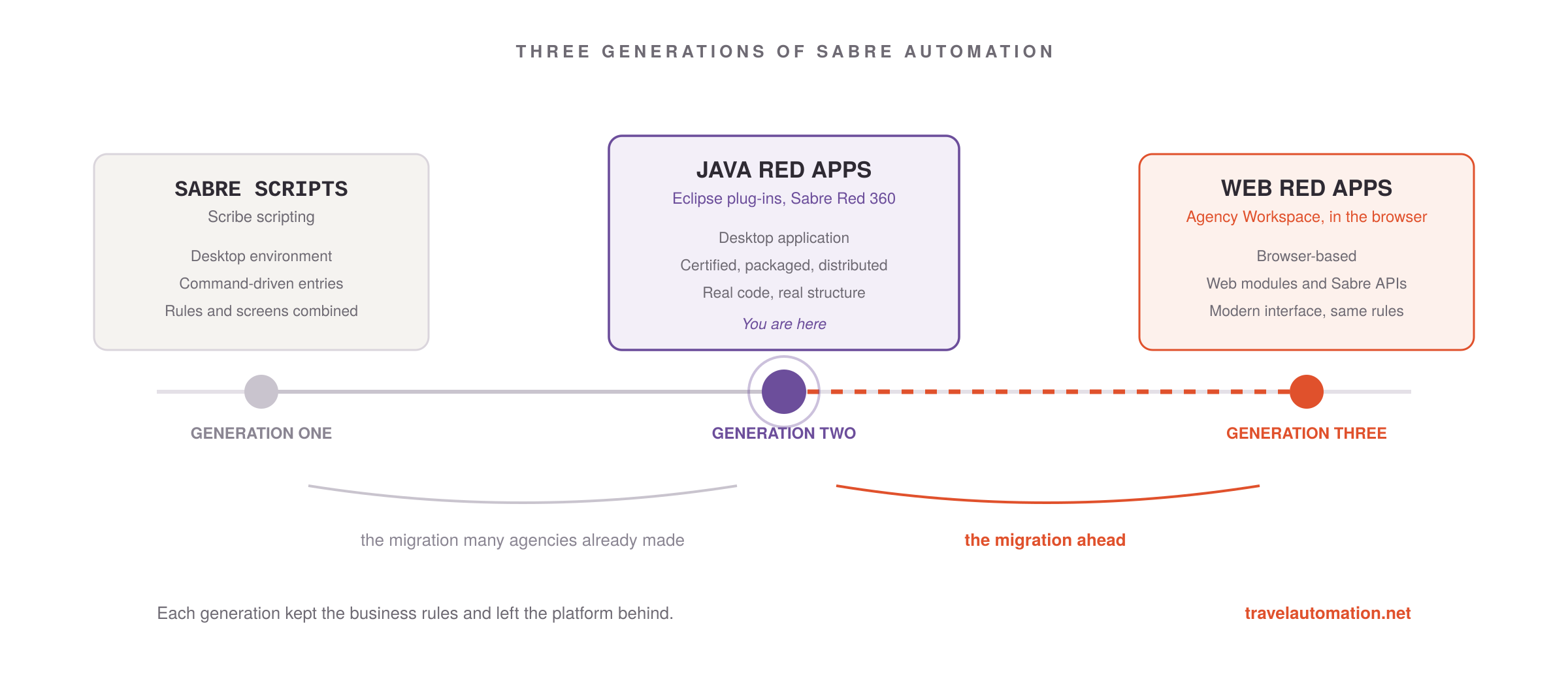
Yes. That one too. The good news is that a well-built Java Red App is generally in far better shape for this migration than a decades-old script — but only if you understand what actually carries over and what doesn't.
What Is a Desktop Red App?
A traditional Red App is essentially an Eclipse plug-in written in Java, running inside the Sabre Red 360 desktop.
Building one has always required a specific and fairly demanding skill set: Java programming, the Eclipse development environment, and knowledge of how to hook a plug-in into the desktop's extension points and services. The finished application is packaged as a bundle, declared through configuration files, certified by Sabre, and distributed either privately to your agency or through the Marketplace.
In practice, a desktop Red App usually contains several distinct layers bundled into one deliverable:
- A user interface built with desktop toolkits
- Integration with the Sabre Red 360 desktop itself
- Communication with Sabre through host commands, the emulator, and Sabre APIs
- Business logic encoding your agency's rules
- Connections to agency systems, databases, or external services
- Configuration, logging, and security handling
That middle section — the business logic and the integrations — is where the real investment lives. Much of the rest is the cost of doing business on a desktop platform.
What Changes in a Browser
A Web Red App runs inside Sabre's browser-based Agency Workspace. Sabre's App Developer Toolkit supports web modules built with JavaScript, HTML, and TypeScript APIs, offering capabilities such as host commands, events, logging, configuration, and access to Sabre services.
Notice what isn't on that list: Eclipse. Java. The desktop plug-in framework your application was designed to live inside.
Those aren't incidental details. They're the foundation the whole thing was built on.
What does not survive the move
The user interface. Desktop UI toolkit code has no equivalent in a browser. Every view, dialog, table, and form gets rebuilt in web technologies. This is usually the largest single chunk of the work.
The plug-in integration layer. The mechanisms your application uses to attach itself to the desktop — registering views, contributing to menus, listening for desktop events, resolving services from the plug-in framework — belong to Eclipse. The browser workspace has its own integration model, and it's a different one.
Anything that assumed a workstation. Local file paths, bundled Java libraries, database connections opened directly from the client, local configuration files, and native dependencies all assumed the code was running on the agent's machine. That assumption doesn't hold in a browser.
Some of the packaging and lifecycle. Plug-in manifests and the desktop build pipeline give way to web module structure and a web-oriented build and release process.
What survives — and this is the important half
Your business rules. Approval thresholds, required remarks, client-specific field requirements, validation logic, exception handling, formatting rules. This is the accumulated operational knowledge that made the application worth building in the first place, and it carries over.
Your Sabre integration knowledge. If your Red App already calls Sabre APIs, that work is largely reusable. Request and response handling, error cases, entitlements, and the sequencing your team worked out through trial and error don't have to be rediscovered.
Your integrations with agency systems. How your mid-office, accounting platform, or CRM expects to receive data remains valid no matter what the front end is written in.
The structure itself. A Java application generally has real classes, real separation of concerns, and hopefully some documentation. Compared to a twenty-year-old script where the interface, the Sabre entries, and the business rules are woven together in a single file, that's a considerable head start.
An Advantage Scripts Don't Have
There's a second piece of good news specific to Red App owners.
If your application was built or updated in recent years, it may already contain a web module. Sabre's own sample projects show Red Apps that combine Java plug-in code with TypeScript, JavaScript, and HTML web modules living side by side in the same application.
If your development team already went down that path, part of your migration is effectively underway. The web module code, the patterns your team learned, and any separation between interface and logic all carry forward.
Java Red App owners tend to have the harder-sounding problem and the more manageable actual migration.
Keep the Application Together
Here's a question that comes up early in these conversations: if the browser can't run our Java, should we move the business logic to an external service and call it from the Web Red App?
Sometimes. Not usually.
There are good reasons to split part of an application out:
- Logic that needs to run unattended, without an agent present
- Processing that's genuinely heavy
- Rules that several different applications need to share
- Data that must live in one place with a proper audit trail.
When one of those applies, an external service earns its keep.
But splitting an application in two is not free, and it's worth being clear-eyed about the bill. Calling an external service securely from within an agent's workspace means authentication and authorization, credential management, transport security, and careful handling of any traveler or payment data crossing that boundary. Then hosting, monitoring, availability, and version management — for the rest of the application's life. Every one of those is solvable. None of them is trivial, and each one is a new place for things to go wrong at 4 p.m. on a Friday.
A Web Red App that holds its own logic is simpler to build, simpler to certify, simpler to reason about, and simpler for whoever maintains it in five years.
So the sensible default is to keep the application together and split off only the pieces with a specific reason to live elsewhere. If a capability genuinely needs to be shared across applications or run without an agent, break it out deliberately. Otherwise, resist the urge to distribute something that was working fine as one piece.
That's an architectural decision worth making on purpose, early, with someone who has built both kinds.
The Skills Question Gets Sharper
For Scribe migrations, the skills gap sits between script developers and web developers. For Java Red Apps, it's more specific, and worth being honest about with whoever maintains your application.
Java and Eclipse plug-in expertise is a valuable engineering skill. It is also not the same as modern front-end web development. A developer who has spent years building desktop plug-ins may read the existing application perfectly and still need support on the browser half.
The reverse gap is just as real. A strong web developer can build an excellent Web Red App interface and still misread what a block of Java is doing with a PNR — not from any lack of skill, but because the code assumes a decade of GDS context it never states out loud.
A migration draws on three competencies: Sabre platform knowledge, Java experience to interpret what exists, and web development skill to build what comes next. Agencies frequently have one or two of those in house. Rarely all three.
What Travel Technology Leaders Should Do Now
The first step is the same as with scripts, though the inventory is usually shorter and the analysis runs deeper.
For each desktop Red App, document:
- What business capability it provides, and who depends on it
- Which parts are user interface and which parts are business logic
- Which Sabre integration points it uses — host commands, emulator, APIs, events
- Which agency systems and databases it connects to
- Whether it already contains a web module
- How current its libraries and Java version are
- Who built it, who maintains it now, and whether that person is still reachable
- Whether Sabre or a third-party product now offers the same capability
Download Java Red App Inventory Worksheet
That last question deserves more weight than it usually gets. Some Red Apps were built years ago to fill a gap that Sabre or the wider market has since closed. Finding that out before you budget a rebuild is worth the hour it takes to check.
Where This Leaves You
Scripts and Java Red Apps come from different eras and different technologies, but they arrive at the same fork in the road. In both cases the question is which parts of the application were solving a business problem and which parts were solving a platform problem — and only the first kind is worth carrying forward.
For a Java Red App, that means separating the logic your agency actually depends on from the Eclipse scaffolding built to host it, then rebuilding the interface on a platform that will still be here in ten years.
There is a real advantage to being second in line. The industry is already learning hard lessons from migrating scripts — like which workflows deserve rebuilding, which belong in a cloud service, and which have quietly been replaced by new products. Because those same lessons apply to Red Apps, agencies that start their assessments now can plan with proven knowledge instead of racing to catch up later.
And you have a starting point most projects would envy: you already know precisely what the application needs to do, because it's been doing it for years.
Let's plan your Red App's future
- Java Red Apps and Web Red Apps under one roof — We've built certified Sabre Red Apps on the desktop and we build them for the browser today. The same team can read your existing plug-in and build what replaces it.
- We look for what you can keep — Your business rules, your Sabre integration work, and your agency system connections are assets. We identify what carries over before anyone writes new code.
- Architecture decided on purpose — Keep the application together or split off a service? We help you make that call deliberately, with the security and hosting implications on the table from day one.
- A staged plan you can budget against — We assess what you have, tell you honestly what carries over and what gets rebuilt, and sequence the work so nothing critical moves without a safety net.