
Sabre Scripts vs. Sabre Web Red Apps: What Travel Agency Leaders Need to Know
I've spent most of my career building things in Sabre, so when agencies ask me what's going to happen to their beloved scripts as Sabre moves toward a browser-based agency workspace, I understand exactly why they're asking — and why the answer matters so much.
For decades, Sabre Scripts have been the quiet workhorses of the travel agency world. They automate repetitive work, standardize agent processes, reduce errors, and make tangled Sabre workflows feel almost civilized. Many agencies have built substantial script libraries over the years — quality control, ticketing, invoicing, approvals, profile management, exchanges, queue processing, remarks, and a hundred agency-specific procedures that nobody remembers writing but everybody depends on.
Now, as the desktop era winds down, travel organizations have to decide what happens to all of that.
The most likely successor is the Sabre Web Red App. And here's the thing I tell everyone up front: while a Red App can perform many of the same business functions as a Sabre Script, the two are fundamentally different animals. This isn't translating a book into another language. It's turning the book into a movie — same story, completely different production.
What Is a Sabre Script, Really?
A Sabre Scribe Script — often referred to as a Sabre Script — is a program that automates or guides workflows inside the traditional Sabre desktop environment.
Scripts typically work the same way an agent does: they collect information, construct Sabre entries, read the responses, decide what happens next, and display a result. In other words, a script is a very fast, very patient agent who never needs coffee.
But here's what I've learned after years of reading other people's Scribe code: the value was never the programming language. The real treasure is the operational knowledge buried inside the script. A single script may encode years of accumulated business rules, such as:
- Which remarks must be added to a PNR
- Which fields are required for a particular customer
- How an agent should handle an exception
- Which queues or PCCs are involved
- When approval is required
- How data should be formatted for accounting or reporting
- What steps must occur before ticketing
I've opened scripts older than some of the agents using them — and the business logic inside was still worth its weight in gold. That logic keeps its value even when the technology executing it changes. That's the whole point of a migration done well.
What Is a Sabre Web Red App?
A Red App is a web-based application designed to run inside of and integrate with Sabre's agency workspace in a web browser.
Sabre's current App Developer Toolkit supports custom or bespoke applications that plug directly into Agency Workspace. The documentation covers the web technologies you'd expect — JavaScript and HTML — along with TypeScript APIs and web-module capabilities such as host commands, events, logging, configuration, and Sabre services.
Freed from the constraints of a traditional script, a Red App can stretch its legs a bit. Depending on how it's designed, it might:
- Read information from the current Sabre workflow
- Present interactive forms with real validation
- Respond to events within the workspace
- Send commands or requests to Sabre
- Call Sabre APIs
- Talk to an agency's internal systems
- Connect to databases or cloud services
- Apply complex business rules outside the agent's workstation
More flexible? Absolutely. More architecturally complex? Definitely. Those two things travel together, like checked bags and fees.
The Main Technical Differences
1. Desktop scripting versus web application development
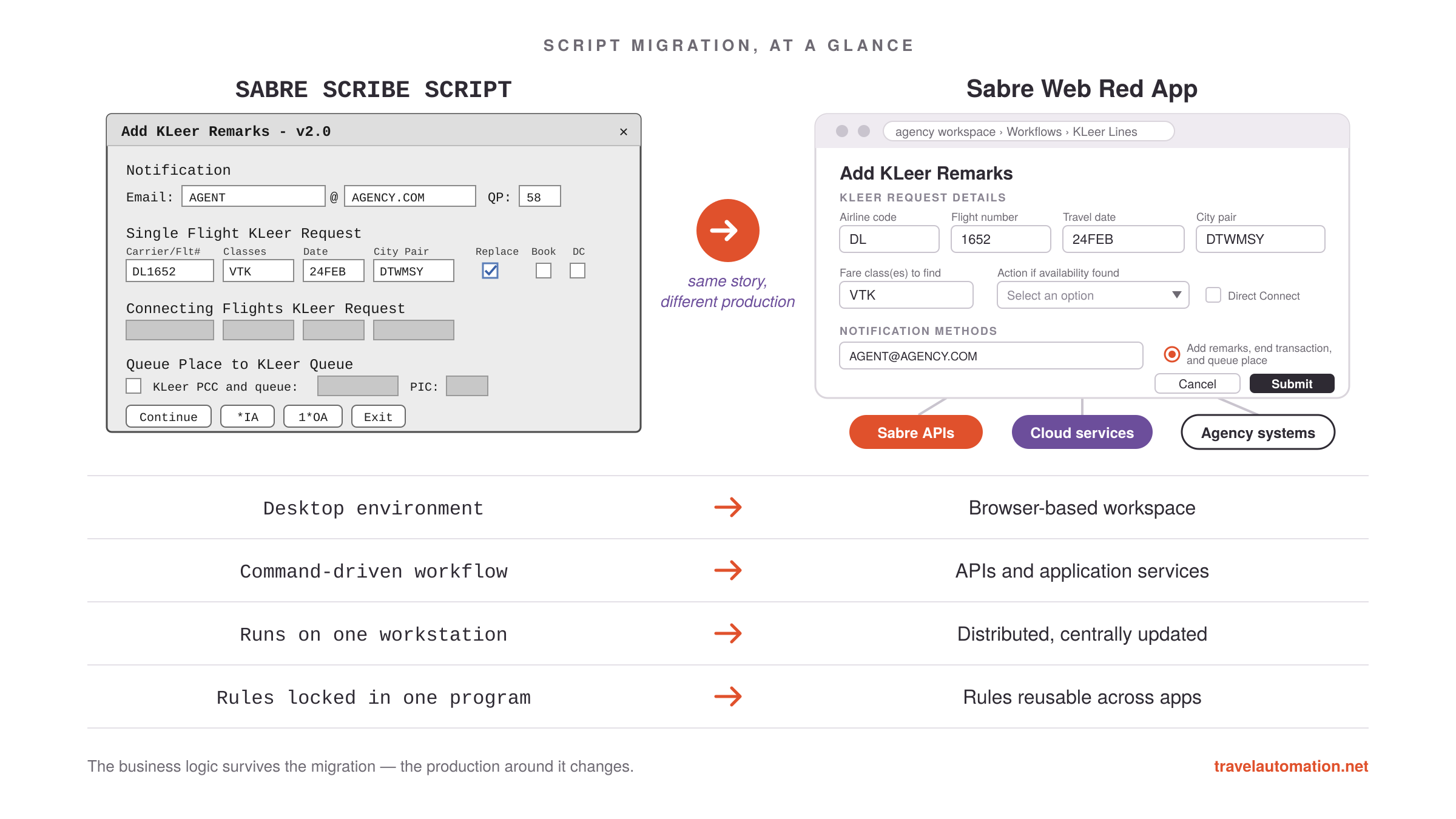
Sabre Scribe was built around a desktop application and a specialized Sabre scripting environment. Red Apps live in the browser world: TypeScript, JavaScript, HTML, CSS, web frameworks, API clients, authentication, backend services, databases, cloud infrastructure — the whole modern buffet.
For agency leadership, this means the skills needed to maintain the application change. Speaking as someone who has one foot in each world: a developer who knows Scribe and Sabre formats very well may not have the web-development skills to build a secure, maintainable Red App. And a brilliant web developer who's never priced an itinerary may look at Scribe code and see hieroglyphics.
A successful migration generally needs both skill sets in the room. Preferably talking to each other.
2. Command-driven workflows versus service-driven integrations
Traditional scripts automate the command-oriented workflow an agent uses: issue an entry, examine the response, collect input, decide the next entry. Repeat until done.
A Red App can still work with an agent's Sabre workflow — but it can also use application services, SDK capabilities, and Sabre APIs. Which raises one of my favorite architectural questions: Should the new application reproduce the original sequence of Sabre entries, or should it perform the underlying operation through an API?
Reproducing the original workflow can be faster to build. Redesigning around APIs can produce something more reliable and maintainable. The right answer depends on API availability, agency requirements, Sabre entitlements, workflow complexity, and what actually needs to stay visible to the agent. I've argued both sides in the same afternoon.
3. Basic script interfaces versus richer user experiences
A Scribe Script can prompt an agent and walk them through a process, but its interface options are, let's say, charmingly minimalist.
A Red App can offer the kind of interface people expect from a modern business application:
- Searchable lists
- Tables
- Date pickers
- Autocomplete fields
- Real-time validation
- Conditional form sections
- Progress indicators
- Error messages that actually explain the error
- Responsive layouts
- Contextual instructions
That can shrink training time and make complicated processes far easier to follow. But a word of caution from someone who has shipped a few of these: a prettier interface does not automatically make a better workflow. The application still has to anticipate and reflect how experienced agents actually work — and experienced agents will be quick to tell you when it doesn't.
4. Local execution versus distributed architecture
A traditional script does most of its work right there in the Sabre desktop environment. Cozy. Self-contained.
A Red App may be just the visible piece of a larger system — the interface in Agency Workspace talking to an externally hosted application that holds the business logic, database, audit history, reporting, or integrations with other agency systems. That separation brings real advantages: logic can be reused, updated centrally, monitored, and connected beyond Sabre. It also brings a list of grown-up responsibilities:
- Hosting
- Authentication and authorization
- Application security
- Monitoring and logging
- Data privacy
- Availability
- API version management
- Ongoing infrastructure costs
When you compare the cost of a Red App to the cost of maintaining a script, make sure this list is on the table. It's the part nobody puts in the brochure.
5. Script updates versus application deployment
Updating a script is a fairly contained affair: modify, test, distribute, done before lunch.
A Red App follows a fuller software-development lifecycle — development, testing, certification, deployment, release management — with apps packaged into Red App bundles and delivered on Sabre Marketplace. The extra structure genuinely improves quality and governance, but plan for more formal testing and release scheduling. "Done before lunch" becomes "scheduled for the next release."
6. Tightly coupled logic versus reusable business services
In many legacy scripts, the user interface, Sabre commands, decision-making, and business rules are all knotted together in one program — a beautiful, load-bearing tangle.
Modern web applications let you separate those concerns. For example, an agency's quality-control rules could live in an external service. A Red App could call that service while an automated queue-processing application uses the exact same rules with no agent present at all. Write the rules once, use them everywhere.
The catch — and this is where the real detective work happens — is that the migration team must first figure out which parts of the old script are genuine business rules and which parts were just clever workarounds for the old interface's limitations. Roughly half of what I untangle falls into the second category. That code served honorably. It can now retire.
Why a Sabre Script Cannot Simply Be Uploaded to the Web
I get asked this a lot, usually with a hopeful tone: "Can't we just... convert them?"
I wish. A Sabre Script and a Red App live in different technical environments. The original script may depend on desktop-specific functions, screen responses, script forms, local settings, local file references, or assumptions about exactly how the agent moves through Sabre. None of those dependencies automatically exists in a browser-based application.
So the migration is less "convert the syntax" and more "interview the script about its life." Each one needs to be analyzed to determine:
- What business problem it solves
- Which rules it enforces
- Which Sabre functions it uses
- Which parts still provide value
- Whether the same function is now available through an API or existing product
- Whether the workflow should stay agent-assisted or become fully automated
- Where the new application's data and business logic should live
Sometimes a Red App is the right replacement. Sometimes an external cloud application, an automated service, an existing Sabre product, or a third-party solution fits better. The script doesn't get a vote — the business problem does.
Should Every Sabre Script Become a Red App?
No. And I say that as someone who enjoys building Red Apps.
The goal is not to recreate your script library one-for-one, like a museum replica. The goal is to preserve valuable business capabilities using the most appropriate modern technology.
A script that guides an agent through an interactive workflow? Great Red App candidate. A script that grinds through unattended queue processing at 3 a.m.? Probably belongs in a cloud service, where it can grind in peace. A script that duplicates functionality now available in a commercial product? It may not need rebuilding at all — sometimes the best migration is a quiet deletion.
And several related scripts can often be consolidated into a single application rather than converted separately. Fewer apps, fewer headaches.
That's why Travel Automation's migration process evaluates Red Apps, external cloud applications, existing third-party products, and combinations of all three — rather than assuming every script is headed for the same destination.
What Travel Agency Leaders Should Do Now
Step one is not technical at all: build an accurate inventory of your existing scripts. (Yes, including the ones nobody admits to owning.)
For each script, document:
- Its name and purpose
- The teams and PCCs that use it
- How frequently it runs
- The Sabre entries or services it relies on
- The business rules it contains
- The systems it exchanges data with
- The risks if it becomes unavailable
- The employees who actually understand the workflow
- Whether an existing product could replace it
Download Sabre Script Inventory Worksheet
Then group your scripts by business importance, technical complexity, and migration urgency. Analyze the most critical workflows first — especially anything touching ticketing, financial controls, customer-specific requirements, quality control, or high-volume agent processes. Those are the ones that hurt most when they break, and the ones that reward careful planning.
A Migration Is Also an Opportunity
Here's my honest engineer's take: yes, moving from Sabre Scripts to web-based applications is work. But it's also the first excuse in years — maybe decades — to look hard at workflows that have been running on autopilot.
A modern replacement can do more than reproduce the old script. It can improve usability, centralize business rules, connect Sabre with the rest of your agency's systems, provide better reporting, support unattended automation, and make the next change far easier than this one.
The trick is preserving the operational knowledge inside your original scripts without preserving every limitation of the original technology. Keep the wisdom. Leave the workarounds.
Travel Automation has been developing Sabre Scribe solutions since 1990 — long enough to have written some of the scripts now being migrated, which is a special kind of full-circle moment. We've built Sabre Red Apps, cloud-based services, and everything in between. We help agencies document their existing script libraries, identify the right replacement for each workflow, and create a practical migration roadmap.
Let's plan the future of your scripts
- Sabre expertise since 1990 — We’ve been writing Scribe code since the language first hit the scene, but we’re just as fluent in building today's certified Sabre Web Red Apps.
- The right home for every script — Whether it belongs in a Red App, a cloud service, an existing product, or deserves an honorable retirement, we never force a one-for-one rebuild.
- Preserve the wisdom; drop the workarounds — We extract the vital operational knowledge buried in your scripts and leave the constraints of legacy technology behind.
- A practical roadmap, not a leap of faith — We take the guesswork out of the process by helping you catalog your library, weigh the risks, and migrate in manageable, sensible waves.